Microsoft 365 Copilot: Release date and Availability
Enterprise Customers:
Since June 12, 2024, Microsoft 365 Copilot is generally purchasable across all sales channels by enterprise customers as paid add-on for:
- Microsoft 365 Apps for business/Apps for enterprise/Business Basic/Business Premium/Business Standard/F1/F3/E3/E5
- Office 365 F3/E1/E3/E5
- Exchange Kiosk/Plan 1/Plan 2
- SharePoint Plan 1/Plan 2/Kiosk
- OneDrive for Business Plan 1/Plan 2
- Microsoft Clipchamp
- Microsoft Teams EEA/Enterprise/Essentials
- Microsoft Planner Plan 1
- Microsoft Planner and Project Plan 3/Plan 5/Project Online Essentials
- Visio Plan 1/Plan 2
Educational Customers:
Starting June 12, 2024, Microsoft 365 Copilot is generally purchasable by educational organizations as paid add-on for:
- Microsoft 365 Apps for business/Apps for enterprise/Business Basic/Business Standard/Business Premium/F1/F3/E3/A3/E5/A5
- Office 365 F3/E1/E3/A3/E5/A5;
- Exchange Kiosk/Plan 1/Plan 2
- SharePoint Plan 1/Plan 2/Kiosk
- OneDrive for Business Plan 1/Plan 2
- Microsoft Clipchamp
- Microsoft Teams EEA/Enterprise/Essentials
- Microsoft Planner Plan 1
- Microsoft Planner and Project Plan 3/Plan 5/Project Online Essentials
- Visio Plan 1/Plan 2
Available through the following licensing programs:
- Enrollment for Education Solutions (EES)
- Cloud Solution Provider (CSP)
Personal & Family:
Beginning January 15, 2024, Copilot Pro is available and like Microsoft 365 Copilot but for individuals and families and Copilot is not integrated in some Microsoft apps. Copilot Pro is purchasable as paid add-on for subscribers of
- Microsoft 365 Personal
- Microsoft 365 Family
Did you mean Microsoft Copilot (previously Bing Chat & Bing Chat Enterprise)?
Microsoft 365 Copilot: Price
Promotion
Check out our promotion and save 15% on your Microsoft 365 Copilot purchase with SCHNEIDER IT MANAGEMENT – available until June 30, 2025: https://www.schneider.systems/microsoft-copilot-for-microsoft-365-promotion-save-15/.
Enterprise and Educational Customers:
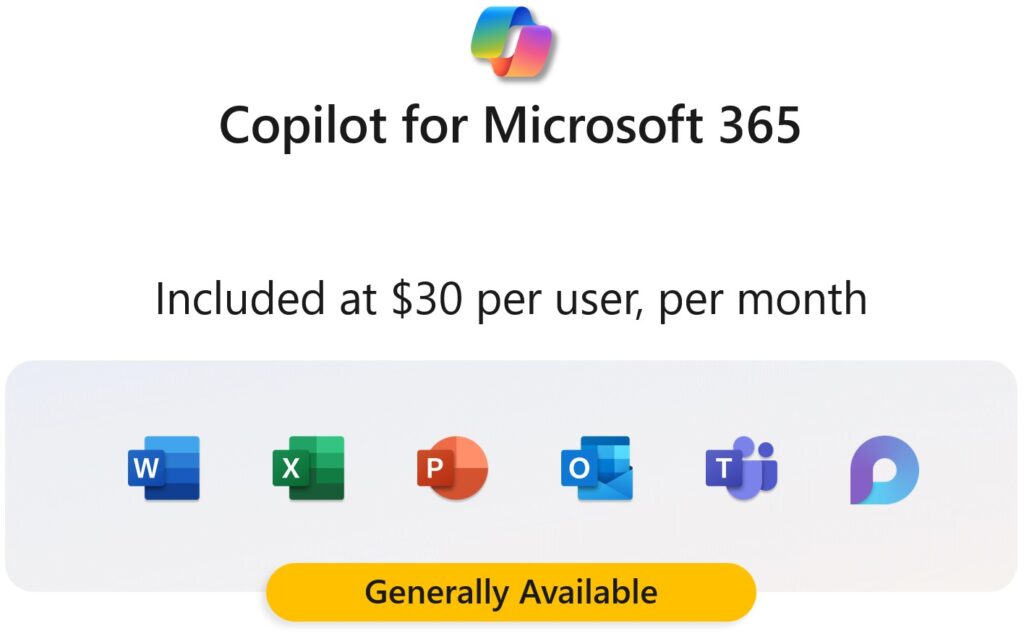
Microsoft 365 Copilot is available as an add-on license, with Microsoft charging a price of $30 per user per month. This price rules across all purchasing channels, customer types and order quantites – no exceptions from Microsoft’s side.
Personal & Family:
Copilot Pro costs 20$ (22€) per user per month. This price is non-negotiable from Microsoft’s side.
Is there a free trial on Microsoft 365 Copilot?
No, Microsoft made it clear that there are no trials available for Microsoft 365 Copilot or Copilot Pro.
Microsoft 365 Copilot: Licensing Requirements
As of January 15, 2024, Microsoft has removed the 300-seat purchase minimum for Microsoft 365 Copilot. This means, that a qualifying organization can license from 1 to infinite add-on licenses.
For a user to access Microsoft 365 Copilot, you need to fulfill both of the following two (2) conditions:
1. Licensing Prerequisites:
Each user that wants Microsoft 365 Copilot needs to have the right license prerequisites, as listed above.
2. Microsoft 365 Copilot add-on licenses:
Each user that wants Microsoft 365 Copilot needs an add-on license for 30$ per user per month.
Consult the Microsoft Partner of your trust for licensing advice concerning Microsoft 365 Copilot and its best implementation for your business case.
Microsoft 365 Copilot: What is included?
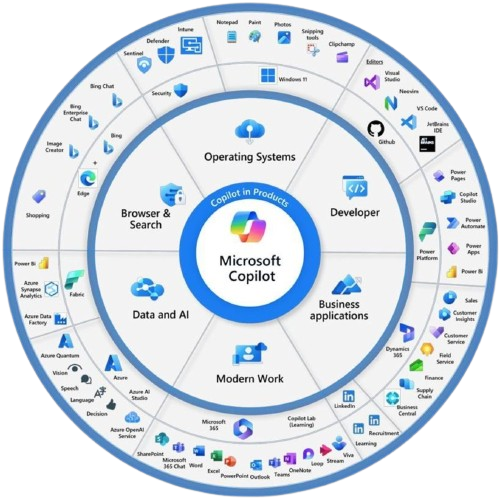
Microsoft 365 Copilot includes:
- Copilot in Word
- Copilot in PowerPoint
- Copilot in Outlook
- Copilot in Excel
- Copilot in OneNote (only available on Win32 desktops; all devices starting sometime during their fiscal year of 2025)
- Copilot in SharePoint
- Copilot in OneDrive
- Microsoft 365 Chat (find more below).
- Priority access to the latest models (such as OpenAI’s GPT-4 Turbo)
- Image Creator from Microsoft Designer 100 boosts per day
- Copilot in Forms (not included in Copilot Pro, but included in Microsoft 365 Copilot)
- Copilot in Teams (not included in Copilot Pro, but included in Microsoft 365 Copilot)
- Copilot in Loop (not included in Copilot Pro, but included in Microsoft 365 Copilot)
- Copilot in Whiteboard (not included in Copilot Pro, but included in Microsoft 365 Copilot)
- Microsoft Copilot Studio: Build standalone copilots for Microsoft 365 Copilot (not included in Copilot Pro, but included in Microsoft 365 Copilot)
Find Microsoft 365 Copilot feature details by Microsoft.
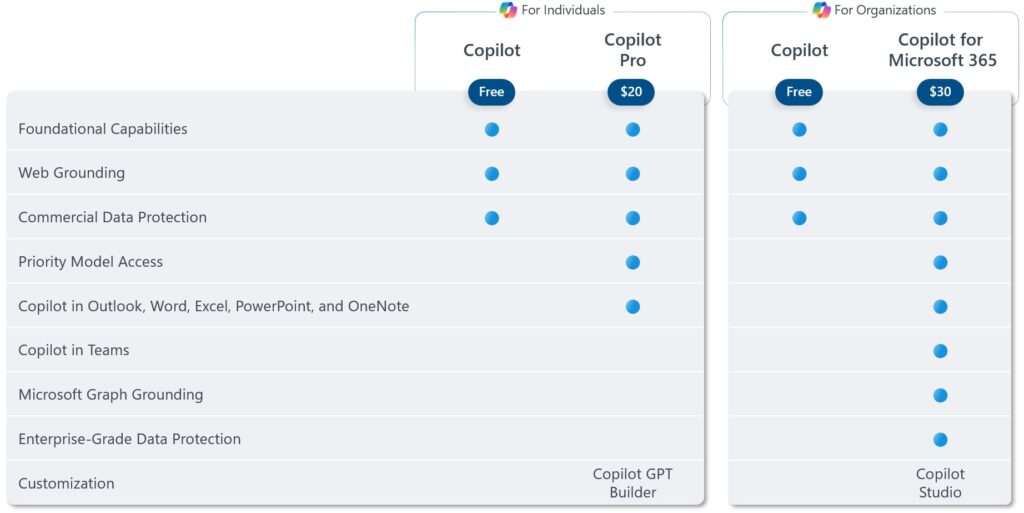
Copilot vs. Copilot Pro. vs. Microsoft 365 Copilot
The table below explains the differences between Copilot, Copilot Pro and Microsoft 365 Copilot.
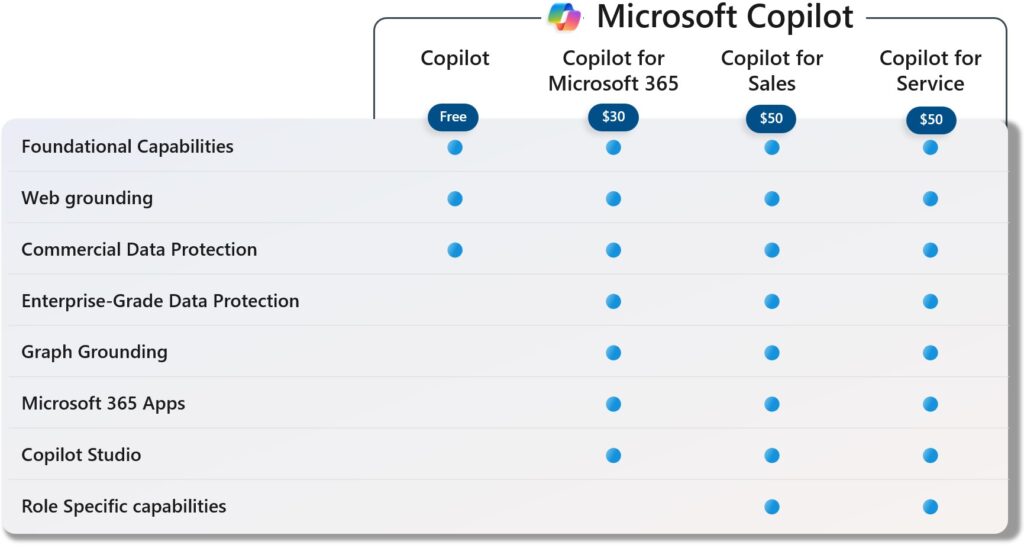
Copilot vs. Microsoft 365 Copilot vs. Microsoft 365 Copilot for Sales vs. Microsoft 365 Copilot for Service
The table below explains the differences between Copilot, Microsoft 365 Copilot, the new Microsoft 365 Copilot for Sales and Microsoft 365 Copilot for Service.
Microsoft 365 Copilot: Is it worth it?
According to recent studies, Microsoft 365 Copilot has substancial benefits for the work output in organizations.
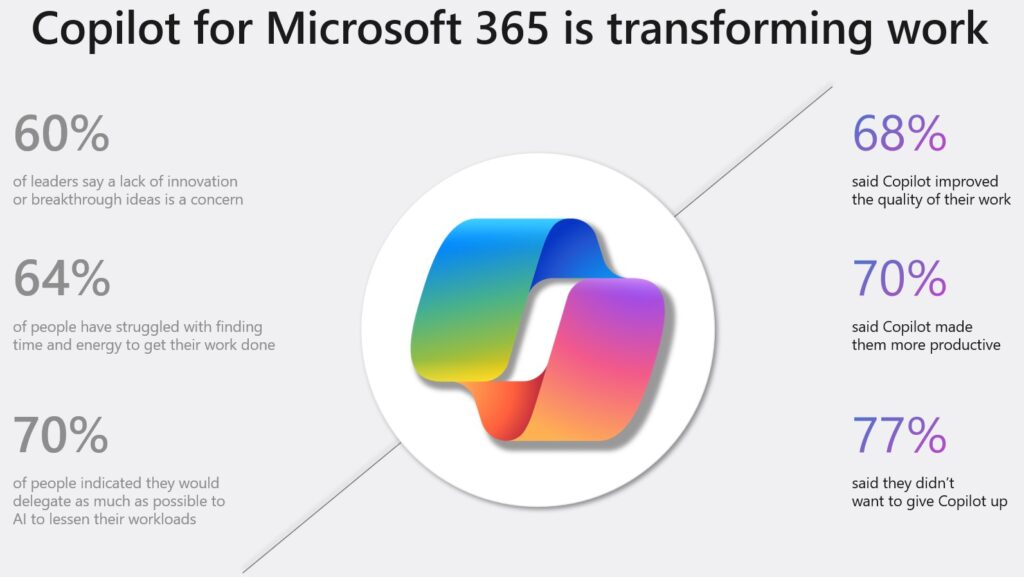
Another Microsoft study questioned 1300 users and found that Microsoft 365 Copilot saves 14 minutes a day on average (5 hours per month), with some users saving up to 30 minutes per day (10 hours per month).
Microsoft 365 Copilot: Licensing channels
Effective January 15, 2024, Microsoft 365 Copilot is available across all channels. These are:
- Enterprise Agreement (EA)
- Enterprise Subscription Agreement (EAS)
- Microsoft Customer Agreement – Enterprise (MCA-E)
- Microsoft Direct
- Cloud Solution Provider (CSP)
- Enrollment for Education Solutions (EES; educational customers only)
SCHNEIDER IT MANAGEMENT is your first choice for all Microsoft licensing as one of the few an experienced and registered Licensing Solution Partner (LSP). Contact us for expert services and learn how to best implement Microsoft 365 Copilot in your organization.
Microsoft 365 Copilot: Download
The Microsoft 365 Copilot adoption guide will be available for download soon. This guide will be a valuable resource for driving the adoption of Copilot capabilities within your organization.
Downloading Microsoft 365 Copilot
- Subscription: Ensure that your organization has an active required license (see above).
- Add-on Purchase: Purchase the Microsoft 365 Copilot add-on.
- Microsoft 365 Admin Center: Go to the Microsoft 365 admin center and navigate to the “Billing” section. Here, you can see the available add-ons for your subscription.
- Download: Select the Microsoft 365 Copilot add-on and proceed with the download.
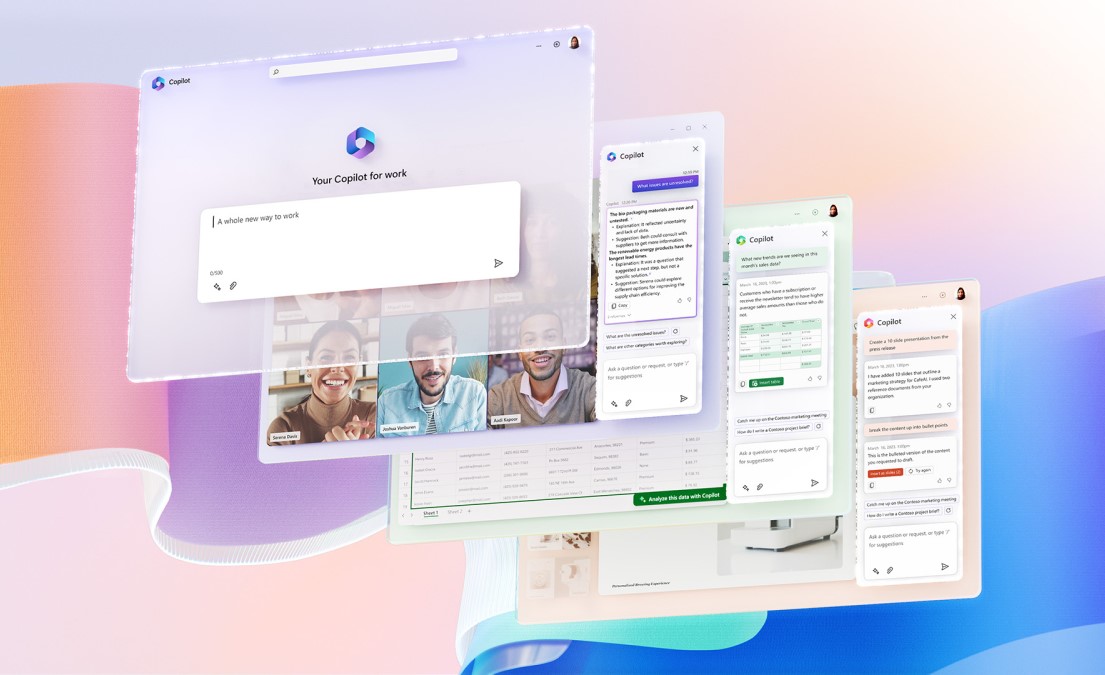
Implementing Microsoft 365 Copilot
For a full guidance, go the Admin Portal Microsoft 365 Copilot Implementation.
- Technical Requirements: Ensure that your organization meets the technical requirements for using Copilot.
- Enable Features: Some features need to be enabled for Copilot to work correctly.
- Permissions and Policies: Set up permissions policies.
- Admin Controls: Understand and manage admin controls for security, privacy, compliance, and data residency.
Microsoft 365 Copilot: includes Microsoft 365 Chat
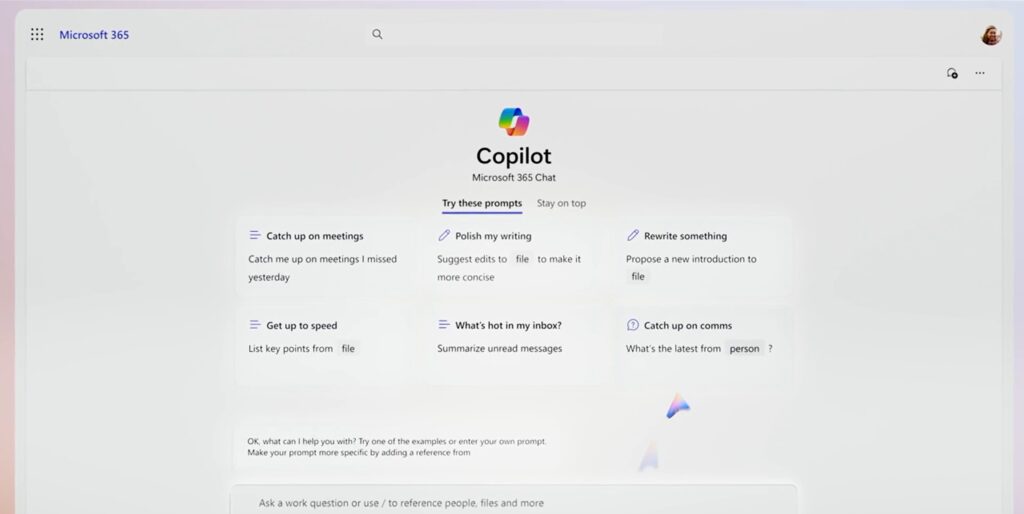
Microsoft 365 Chat is a new, hero experience in Microsoft 365 Copilot (previously announced as Business Chat). Microsoft 365 Chat acts as a comprehensive assistant, delving into the vast expanse of your work-related data, including emails, meetings, chats, documents, and even web content. It possesses an in-depth understanding of you, your role, your priorities, and your organization. Rather than merely answering simple queries, it proactively assists you with complex or monotonous tasks.
Microsoft 365 Copilot: How does it work?
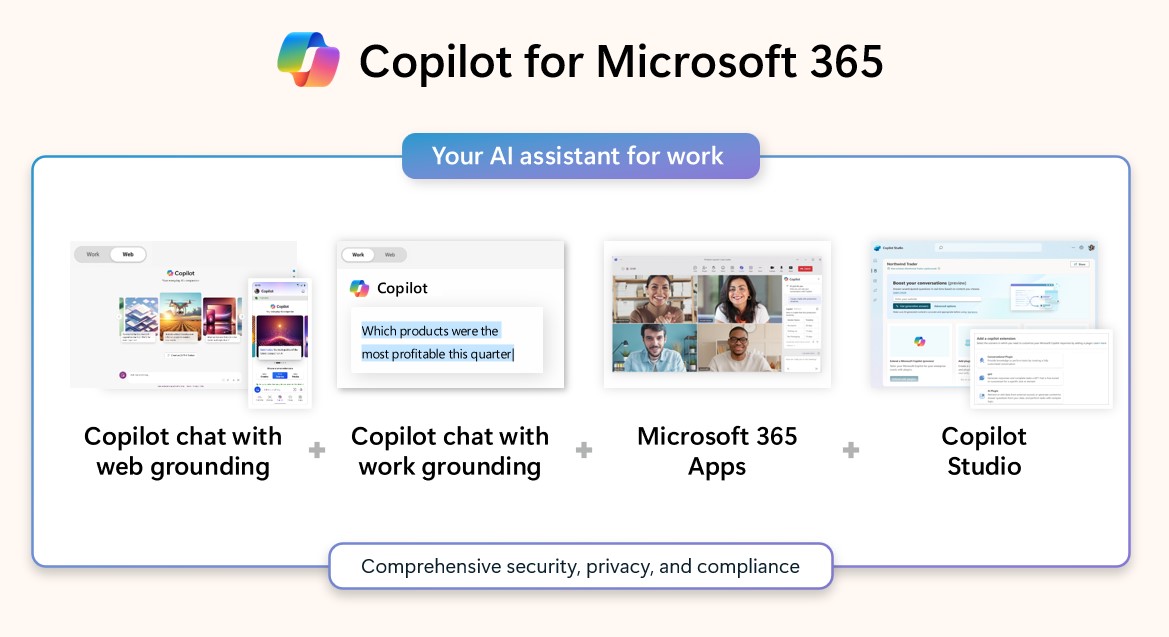
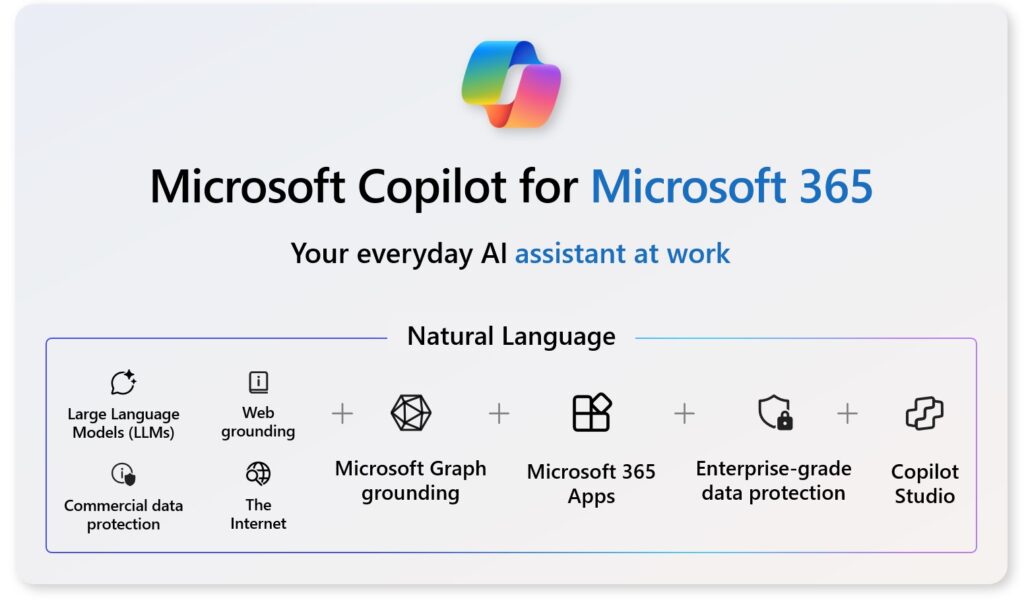
Copilot will be integrated in the main Microsoft 365 Apps, such as Word, Excel, PowerPoint, Outlook, Teams. Microsoft 365 Copilot works across the LLM (including GPT-4), the Microsoft 365 apps, and your data (Microsoft Graph) – your calendar, emails, chats, documents, meetings and contacts – and combines them to completely do tasks for you.
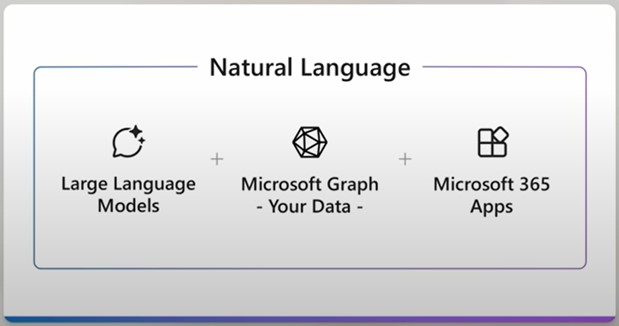
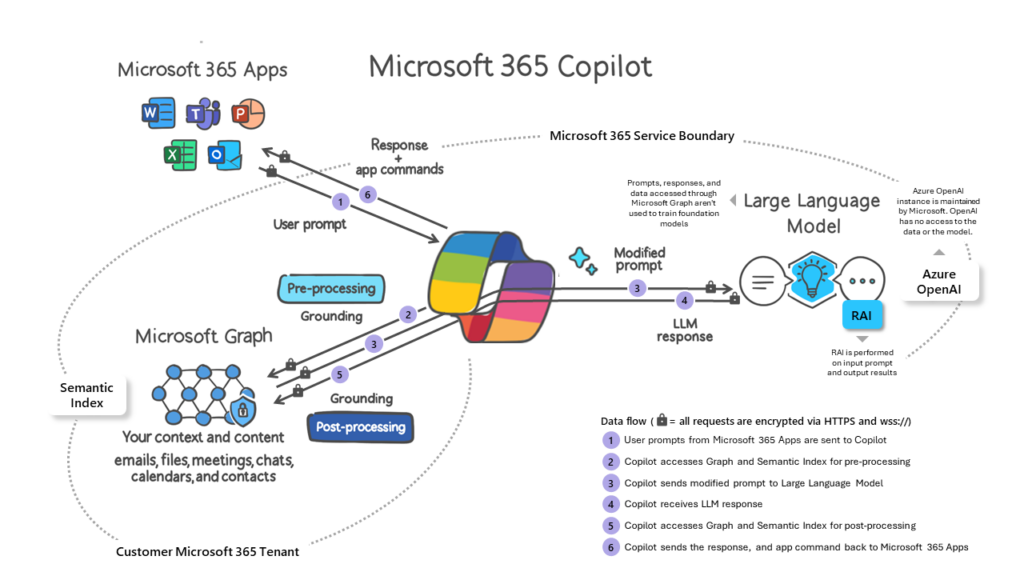
Using the new Microsoft 365 Chat (formerly Business Chat) feature of Microsoft 365 Copilot, you can type in a natural language prompt in any Microsoft 365 App and it will creatively do the task for you.
Example: In PowerPoint, you type in “Create a 15 slide presentation about the last quarters financial results using the [filename]”. Microsoft 365 Copilot will automatically create the full presentation based on your file’s content, structure it appropriately and it lets you make dynamic changes afterwards. For more info on how to prompt in Microsoft 365, read this Microsoft 365 Copilot Prompt Guidance.
With Copilot, users will make use of more features that are already available within Microsoft 365 Apps. As Microsoft puts it: “The average person uses less than 10% of what PowerPoint can do. Copilot unlocks the other 90%.”
Find an Microsoft 365 Copilot explainer video series from Microsoft on Youtube.
Microsoft 365 Copilot: Data location and offerings
Will my data stay in my selected country?
Yes, it will – under the following conditions. Effective March 7, 2024, Microsoft assures that content for interaction data with Microsoft 365 Copilot will be stored according to your specified data storage location for Microsoft 365 data. This commitment only applies to customers whose tenants are provisioned in specific geographies, with add-on options available for additional geographies below. You can already delete content of interactions data with Microsoft 365 Copilot at any time.
Microsoft 365 provides an array of data storage options to help support your data residency and privacy obligations. Each of the following also applies to content of interactions with Microsoft 365 Copilot.
- Product Terms Data Residency provides data residency commitments for Exchange Online, SharePoint Online, and Microsoft Teams in the following country and regions: Australia, Brazil, Canada, France, Germany, India, Japan, Norway, Qatar, South Africa, South Korea, Sweden, Switzerland, the United Kingdom, the United Arab Emirates, United States, and the European Union.
- Advanced Data Residency add-on (ADR) provides eligible customers with expanded coverage of Microsoft 365 workloads, committed data residency in local datacenter regions, and prioritized tenant migration services. ADR is available in all the regions covered by Product Terms Data Residency, as well as Poland, Italy, and Israel with new local data center regions in Mexico and Spain coming soon.
- Multi-Geo Capabilities add-on provides customers with the ability to expand their Microsoft 365 presence to multiple geographic regions within a single existing Microsoft 365 tenant. Multi-Geo Capabilities are available in the same set of local regions as ADR plus the three macro regions – Americas, Asia-Pacific, and European Union. Please review details for covered workloads.
- EU Data Boundary allows customers in the European Union and the European Free Trade Association to keep their data in the EU.
Read more in our article on Microsoft 365 Copilot: Data residency.
Microsoft 365 Copilot: Data security
Will Microsoft 365 Copilot be trained with customers’ data?
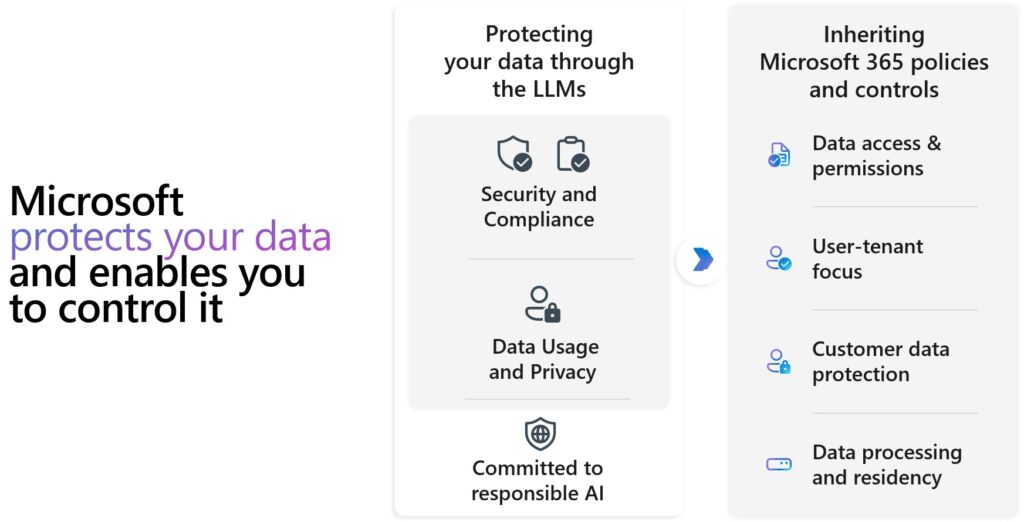
No. Microsoft has made it clear that Copilot does not utilize customer data, including prompts, for the purposes of training or enhancing their models. They are of the belief that customers’ data belongs solely to the customer and therefore maintain the guarantees they have always made regarding the security and privacy of enterprise and commercial data, even in the age of AI.
Where does user’s data go and what does Microsoft see?
Microsoft’s dedication to data security and privacy within the enterprise remains unaltered, and Copilot automatically inherits the customers’ security, compliance, and privacy regulations for Microsoft 365.
Any information entered by a user, as well as the data retrieved from the prompts, and the resulting responses are kept within the Microsoft cloud. This is in accordance with Microsoft’s existing data security commitments. Find more info in the link section below.
Conclusion
Microsoft 365 Copilot embodies the integration of AI into Microsoft 365. By integrating LLMs with your data in the Microsoft Graph and the Microsoft 365 apps, Microsoft 365 Copilot helps users complete tasks more efficiently and effectively. The tool is now available to enterprise and educational customers. For families and individuals, there is the new Copilot Pro purchasable – as replacement for Microsoft 365 Copilot for families and individuals.
If you have any questions, just contact SCHNEIDER IT MANAGEMENT for expert services on Microsoft licensing for your organization.
More information
FAQ
When will Microsoft 365 Copilot be available to users?
- Microsoft 365 Copilot is already generally available for enterprise customers since November 1, 2023. For educational staff, it is available from January 1, 2024, and for students aged 18 and above from May 15, 2024. For Microsoft 365 Personal and Family subscribers, Copilot Pro is purchasable.
What is the pricing and licensing model for Microsoft 365 Copilot?
- Microsoft 365 Copilot is offered as an add-on license, priced at $30 per user per month. To acquire Copilot, licensed users need on of the correct license prerequisites to be eligible for licensing the add-on.
Is there a free trial on Microsoft 365 Copilot?
- No, Microsoft made it clear that there are no trials available for Copilot at general availability.
Through which channels will Microsoft 365 Copilot be available for licensing?
When will Microsoft 365 Copilot be available through CSP?
- It has become available as of January 15, 2024.
How can I download and implement Microsoft 365 Copilot?
- The adoption guide for Microsoft 365 Copilot will be downloadable soon, guiding organizations in implementing Copilot’s capabilities. The steps involve ensuring an active license prerequisite, purchasing the Copilot add-on, navigating to the “Billing” section in the Microsoft 365 Admin Center, and managing technical requirements, features, permissions, and change management.
What distinguishes Microsoft 365 Copilot from Microsoft Copilot (formerly Bing Chat & Bing Chat Enterprise)?
- Microsoft 365 Copilot differs by integrating AI into all Microsoft 365 Apps and offering enhanced data security. It utilizes company-specific data, ensuring more precise AI understanding compared to Bing Chat Enterprise.
What is Microsoft 365 Chat within Copilot?
- Microsoft 365 Chat, previously Business Chat, acts as a comprehensive assistant within Copilot, offering deep insights into work-related data to proactively assist users with tasks and inquiries across various Microsoft 365 Apps.
How does Microsoft 365 Copilot operate within Microsoft 365 Apps?
- Copilot integrates into key Microsoft 365 Apps, leveraging AI and Microsoft Graph data to perform tasks and respond to natural language prompts efficiently. It aims to unlock the untapped potential of Microsoft 365 Apps, making tasks more intuitive and robust for users.
What about the privacy and data usage within Microsoft 365 Copilot?
- Microsoft maintains strict data privacy standards, ensuring customer data is not utilized for training Copilot’s models. Users’ data and interactions within Copilot are secured within the Microsoft cloud, aligning with Microsoft’s existing data security commitments.
How can I get expert services for my business on Microsoft licensing?